 thingiverse
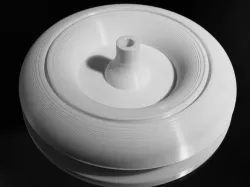
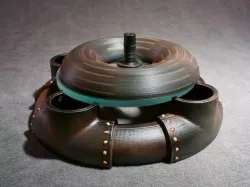
3D Spin Top
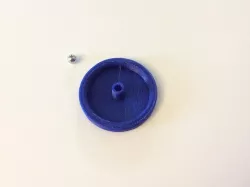
The best spin tops have a tip made of a very hard material in order to minimize friction between the top and the spin surface. This design requires a steel ball to be glued into the bottom of the print. One design uses 1/4 inch stainless steel ball bearings and the other 3/8 inch (Amazon has them). By using these and a concave glass lens or mirror surface, you can get spin times over 6 minutes.
Here's a short video showing the top in action: https://www.youtube.com/watch?v=lySgPi_sKsk
Print Settings
Printer Brand:
MakerBot
Printer:
MakerBot Replicator 2
Rafts:
No
Supports:
No
Resolution:
0.2 inch
Infill:
100% (see note below)
Notes:
I used "bottom solid layers" for the entire print. This gave me 100% infill but without using the infill design, which jammed my printer. Find the setting and make it 100 bottom solid layers.
Post-Printing
Add the Steel Ball
Clean up the print and then use super glue to hold the ball bearing in place.
How I Designed This
Fusion 360 and Simplify3D
Using Fusion 360, I designed the cross section in 2D and then rotated it about the vertical axis using the Revolve command. I exported the STL file and then prepared it for printing with Simplify3D.
Direct link to the original creator's page
More from stevemedwin
Similar Models
 thingiverse
 thingiverse
 prusaprinters
 prusaprinters
 thingiverse
 thingiverse
 cults3d
 thingiverse
Model Specifications
Frequently Asked Questions
How do I download 3D Spin Top?
Click the "View on thingiverse" button above to visit the original model page on thingiverse. You can download the STL file directly from the creator's page for free.
What 3D printer can I use for this model?
This STL file is compatible with most FDM 3D printers (Creality Ender 3, Prusa MK3S+, Bambu Lab, etc.) and resin printers (Elegoo, Anycubic). Check the original page for recommended print settings and materials.
Is this 3D model free to download?
Yes, this model is available as a free download on thingiverse. Some creators accept tips or donations.
Can I modify this STL file?
Most STL files can be modified using free software like Blender, TinkerCAD, or Meshmixer. Check the license on the original thingiverse page to see if modifications are permitted by the creator.