 thingiverse
Abacus
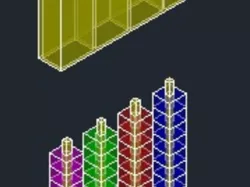
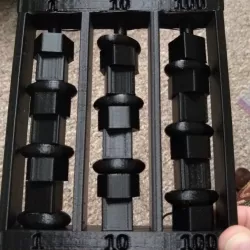
The abacus is a fundamental tool for learning to count.
the use of this tool facilitates and speeds the learning of simple numerical calculation, in fact it is used in primary schools to practice and get in contact with the abstract world of mathematics.
My passion for 3D printing was born at Rome Maker Faire. I made lots of drawings and I studied well the characteristics of 3d printing in all its stages. I have many projects ready to be printed, but I can't afford to buy or build a printer. I hopethat by partecipating in this competition, I can finally give life to my project. It's my childhood dream. Thanks! -
Print Settings
Printer:
None
Rafts:
No
Supports:
Yes
Resolution:
0.25
Infill:
30
Notes:
Only the lid needs supports and you can modify infill if you want.
Post-Printing
The components have been designed in tolerance so that they aren't necessary post processing actions.
You can color the letters with permanent markers.
How I Designed This
The abacus was designed in Inventor.
Everything has been designed to be compact and it closes ina a box.
The rods are square so that the cubes don't rotate.
The lid is divided so as to separete the cubes for color where not used.
The base have a housing for the lid.
Custom Section
Objectives
this simple tool facilitates learning the calculations to children and it's compact, simple to use and in the form.
Audiences
The use of this instrument is dedicated to primary school children and their teachers that can use as a medium of learning.
Moreover the children will approach to the fantastic world of 3d printing.
Preparation
Printing and play!
Step 1
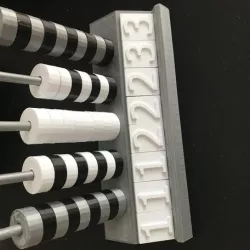
Printing the base, I reccomend you to do the base white so that later you can color the letters: U-blue, DA-red, H-green and K-violet.
Step 2
Printing the 4 rods and then put the glue on the seat base to fix them.
Step 3
Printing the cubes.
There are 10 cubes for each colorsn so you need blue, red, green and violet filament or you can color them in other ways.
You can reduce the infill for them.
Step 4
Printing the lid.
You can rotate it in the way to not generate supports but it's higher.
Results
Students can take advantage of this tool plus interchangeable and customizable with their own name.
Mathematics will be easier to understand and more fun to learn.
3d printer will enter into their lives so that right now they can exploit its potential to have fun but also to make it a passion.
Direct link to the original creator's page
Also Available On
More from giupo
Similar Models
Model Specifications
Frequently Asked Questions
How do I download Abacus?
Click the "View on thingiverse" button above to visit the original model page on thingiverse. You can download the STL file directly from the creator's page for free.
What 3D printer can I use for this model?
This STL file is compatible with most FDM 3D printers (Creality Ender 3, Prusa MK3S+, Bambu Lab, etc.) and resin printers (Elegoo, Anycubic). Check the original page for recommended print settings and materials.
Is this 3D model free to download?
Yes, this model is available as a free download on thingiverse. Some creators accept tips or donations.
Can I modify this STL file?
Most STL files can be modified using free software like Blender, TinkerCAD, or Meshmixer. Check the license on the original thingiverse page to see if modifications are permitted by the creator.