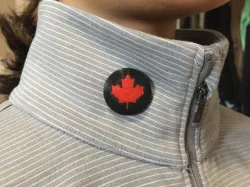
 prusaprinters
Button -basic
Version one is a basic button.
Version two is a maple leaf shaped button.
Version three is a beveled button
Version four (MMU) is a beveled button with a maple leaf, designed for multi material printers.
Visit my website: https://StarLabs3D.com
My YouTube: https://www.youtube.com/c/ToddOlsen
Print instructionsUnassociated tags: Button flag, canada button, canada day, Canada maple, canadian leaf, christmas button, maple leaf button, Star Labs 3D, todd olsen
Category: Accessories Print Settings
Printer Brand: Prusa
Printer: I3 MK3S
Rafts: No
Supports: Yes
Resolution: 0.20
Infill: 15%
Filament: ColorFabb PLA Black, Red, Silver How I Designed This
https://StarLabs3D.com
Direct link to the original creator's page
Also Available On
More from asllexicon

Similar Models
Model Specifications
Frequently Asked Questions
How do I download Button -basic?
Click the "View on prusaprinters" button above to visit the original model page on prusaprinters. You can download the STL file directly from the creator's page for free.
What 3D printer can I use for this model?
This STL file is compatible with most FDM 3D printers (Creality Ender 3, Prusa MK3S+, Bambu Lab, etc.) and resin printers (Elegoo, Anycubic). Check the original page for recommended print settings and materials.
Is this 3D model free to download?
Yes, this model is available as a free download on prusaprinters. Some creators accept tips or donations.
Can I modify this STL file?
Most STL files can be modified using free software like Blender, TinkerCAD, or Meshmixer. Check the license on the original prusaprinters page to see if modifications are permitted by the creator.