 thingiverse
circular array
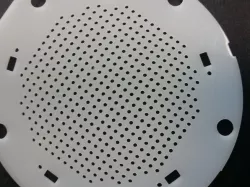
Arrange objects in a circle using 2 different methods. Can avoid clipping objects at the circle edge, and enable counting of objects in the array. The image shows the circular array used to make holes as part of a larger assembly to hold a circular filter.
Instructions
The method parameter should be set to "complete" or "simple":
method simple uses intersection() of a square array with a cylinder
method complete calculates item positions providing the following benefits:
avoid partial items on the edge of the array
ability to count the number of items
The "complete" option ensures that all array objects fully fit in the defined circle area and are not clipped. The "simple" option permits clipping so that the array makes a perfect circle, but the objects on the edge of the circle are likely to be clipped.
Use OpenSCAD for more options.
Direct link to the original creator's page
Also Available On
More from paralab
Similar Models
 thingiverse
 thingiverse
 grabcad
 cgtrader
 grabcad
 thingiverse
 thingiverse
 thingiverse
Model Specifications
Frequently Asked Questions
How do I download circular array?
Click the "View on thingiverse" button above to visit the original model page on thingiverse. You can download the STL file directly from the creator's page for free.
What 3D printer can I use for this model?
This STL file is compatible with most FDM 3D printers (Creality Ender 3, Prusa MK3S+, Bambu Lab, etc.) and resin printers (Elegoo, Anycubic). Check the original page for recommended print settings and materials.
Is this 3D model free to download?
Yes, this model is available as a free download on thingiverse. Some creators accept tips or donations.
Can I modify this STL file?
Most STL files can be modified using free software like Blender, TinkerCAD, or Meshmixer. Check the license on the original thingiverse page to see if modifications are permitted by the creator.