 thingiverse
Dual Stepper Bracket
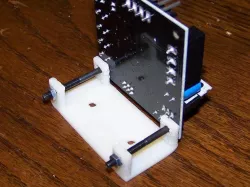
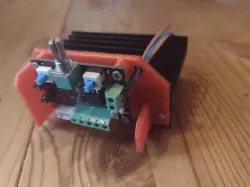
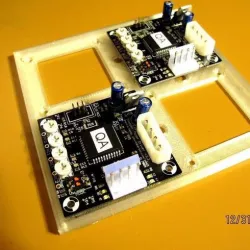
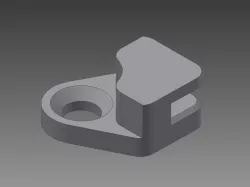
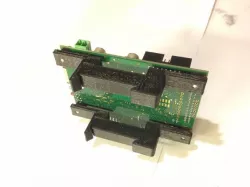
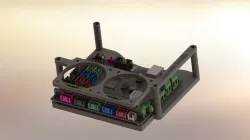
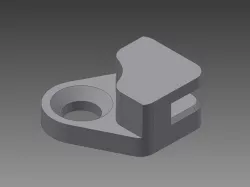
I ran out of room trying to mount all of the electronics for my scratch built 3D printer chassis. Using a couple of these stepper driver brackets was a big help in mounting all of the electronics. The bracket takes up about 1/2 the space of a single stepper driver PCB mounted flush to the chassis. That means you can vertically mount 4 stepper PCBs in about the same space as 1 horizontally mounted card.
Instructions
The object size is large enough to need a heated build platform for best 3D printing results but can be printed with a raft on an unheated platform. I used .3 INFILL in SkeinForge and enabled COMB to minimize the strings of plastic web between the 4 PCB mounting posts. The spacing between mounting holes allows the user to select the best PCB orientation for the particular application. The 3rd photo down shows the PCB mounting I used to get all 3 axis drive steppers mounted with the shortest distance between the card power supply connectors.
Although I used this bracket for mounting Gen 3 stepper driver PCBs, the Gen 4 drivers are the same size (Stepper Driver v3.3 pictured in top photo). The stepper driver PCBs are held to the bracket with two M3 x 35mm screws and nuts, but you can use M3 x 8mm to individually mount each PCB to the bracket. There is room for a 7/8 inch (22mm) spacer between the PCB mounting hole pairs if desired to add more strength to the bracket when using the M3 x 35mm screws. The bracket itself mounts to the chassis surface using two M3 x 12mm screws and nuts.
Direct link to the original creator's page
Also Available On
More from electronickit
Similar Models
 thingiverse
 thingiverse
 cults3d
 pinshape
 thingiverse
 thingiverse
 thingiverse
 prusaprinters
Model Specifications
Frequently Asked Questions
How do I download Dual Stepper Bracket?
Click the "View on thingiverse" button above to visit the original model page on thingiverse. You can download the STL file directly from the creator's page for free.
What 3D printer can I use for this model?
This STL file is compatible with most FDM 3D printers (Creality Ender 3, Prusa MK3S+, Bambu Lab, etc.) and resin printers (Elegoo, Anycubic). Check the original page for recommended print settings and materials.
Is this 3D model free to download?
Yes, this model is available as a free download on thingiverse. Some creators accept tips or donations.
Can I modify this STL file?
Most STL files can be modified using free software like Blender, TinkerCAD, or Meshmixer. Check the license on the original thingiverse page to see if modifications are permitted by the creator.