 GrabCAD
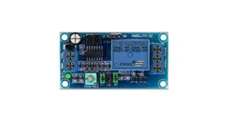
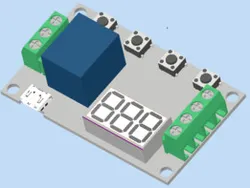
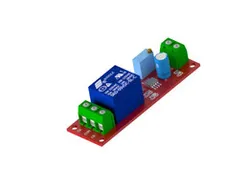
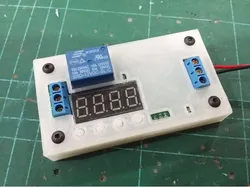
FC-32 DC Time Delay Relay Module
Single Channel Time Delay Relay Module Control Board DC5V or 12V FC-32
TXT from video
What I figured out is that the S1 and S2 jumpers control the length of the timer, changing them changes the length of time that the potentiometer is adjusting for, very short, short, medium and long. This timer can run from 0.1 seconds to 1 hour.
The S5 jumper connects the 12V pos voltage input (VCC) to the relay COM (the center connection).
The S6 jumper turns the delay timer off. (Gerard Pinzone tells me that the S6 changes the timer from a delay on timer to a delay off timer. If the jumper is placed on S6 and the timer activated, the LED on the timer board will stay on until the timer finishes and it will go off. I an not very organized about my bits and pieces so I don't know where the FC-32 Timer is and I can't test this myself. Use the info for the S7 and apply for the S6)
The S7 jumper turns the delay timer on. You can't have a jumper on both S6 and S7 at the same time, if you do, the delay timer won't work, the relay will activate as soon as power is applied.
If you remove the jumper from both the S6 and S7 pins, the timer will not activate.
If you place jumpers on both the S7 and S4 jumpers, the timer is increased 10X.
The timing is kind of rough, but, if you want better times feel free to do them yourself and post them.
Jumper on S7, S1 position 0 and S2 position 1: Lowest, instant. Highest about 1 second
Jumper on S7, S1 position 0 and S2 position 0: Lowest, 3 seconds, Highest 42 seconds
Jumper on S7, S1 position 1 and S2 position 0: Lowest, 0 seconds, Highest 5 seconds
Jumper on S7, S1 position 1 and S2 position 1: Lowest, 38 seconds, Highest 342 seconds
As I said, to increase these times by 10X, put a jumper on both the S7 and the S4.
Direct link to the original creator's page
More from Carl Shelton
Similar Models
 GrabCAD
 GrabCAD
 Thingiverse
 Thingiverse
 CrealityCloud
 Printables
 Thingiverse
 Thingiverse
Model Specifications
Frequently Asked Questions
How do I download FC-32 DC Time Delay Relay Module?
Click the "View on GrabCAD" button above to visit the original model page on GrabCAD. You can download the RENDERING, STEP / IGES, STL file directly from the creator's page for free.
What 3D printer can I use for this model?
This model is compatible with most FDM 3D printers (Creality Ender 3, Prusa MK3S+, Bambu Lab, etc.) and resin printers (Elegoo, Anycubic). Check the original page for recommended print settings and materials.
Is this 3D model free to download?
Yes, this model is available as a free download on GrabCAD. Some creators accept tips or donations.
Can I modify this file?
Check the license (see original page) on the original GrabCAD page. Most STL files can be modified using free software like Blender, TinkerCAD, or Meshmixer.