 youmagine
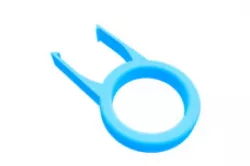
Keycap puller
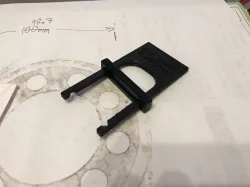
Printing instructions:Print using 0.4mm nozzle or smaller. After printing use fine file to shape a nice edge on both hooks of the tool and to deburr other edges if needed.Tool usage:To pull the keycap with this tool simply push the tool over regular keycap until the hooks snap over both edges of the keycap and then pull straight up.Note: Some keyboard switches and keycap combinations are very hard to pull (such as Cherry MX clears and Signature plastics DSA keycaps). Please use caution when pulling so you don't damage either keycap or key switch.
Direct link to the original creator's page
Also Available On
More from syncon303
Similar Models
 thingiverse
 thingiverse
 thingiverse
 thingiverse
 myminifactory
 thingiverse
 prusaprinters
 thingiverse
Model Specifications
Frequently Asked Questions
How do I download Keycap puller?
Click the "View on youmagine" button above to visit the original model page on youmagine. You can download the STL file directly from the creator's page for free.
What 3D printer can I use for this model?
This STL file is compatible with most FDM 3D printers (Creality Ender 3, Prusa MK3S+, Bambu Lab, etc.) and resin printers (Elegoo, Anycubic). Check the original page for recommended print settings and materials.
Is this 3D model free to download?
Yes, this model is available as a free download on youmagine. Some creators accept tips or donations.
Can I modify this STL file?
Most STL files can be modified using free software like Blender, TinkerCAD, or Meshmixer. Check the license on the original youmagine page to see if modifications are permitted by the creator.