 GrabCAD
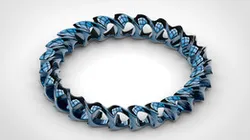
Mobius Pendant + Video Tutorial
Please Subscribe to 'Easy CAD Solutions'
Watch Tutorial: https://youtu.be/Z8lWx0NqrEI
It is a stylish pendant based on mobius geometry and it is a bit tricky to make in solidworks. But it can be made easily by using some simple as well as advanced commands.
List of Important Commands:
Sweep boss (with twist angle 90 degrees)
Refrence Axis
Move/ Copy Bodies
Curve Driven Pattern
Face Curves
Fillets
Direct link to the original creator's page
More from Nishant Gautam
Similar Models
 GrabCAD
 GrabCAD
 GrabCAD
 GrabCAD
 GrabCAD
 GrabCAD
 GrabCAD
 GrabCAD
Model Specifications
Frequently Asked Questions
Where is Mobius Pendant + Video Tutorial published?
This model is published by its creator on GrabCAD. STLFinder only indexes it: the "View on GrabCAD" button above opens the original page, where the creator shares the RENDERING, SOLIDWORKS, STL files under their own license.
What 3D printer can I use for this model?
This model is compatible with most FDM 3D printers (Creality Ender 3, Prusa MK3S+, Bambu Lab, etc.) and resin printers (Elegoo, Anycubic). Check the original page for recommended print settings and materials.
Is this 3D model free?
Yes, the creator shares it at no cost on GrabCAD. Some creators accept tips or donations.
Can I modify this file?
Check the license (see original page) on the original GrabCAD page. Most STL files can be modified using free software like Blender, TinkerCAD, or Meshmixer.