 thingiverse
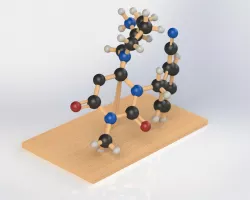
Molecule Construction Kit
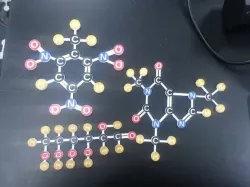
Use the pieces to build a model of a molecule.
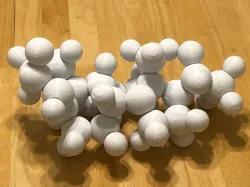
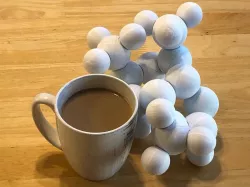
Making models of molecules using ball and sticks or similar materials is a common middle school science activity. Now you can 3D print your molecule model.
Open the file Molecule Construction Kit on Tinkercad.com and you'll have all the parts you need. Or download the parts individually and put them together in your favorite cad program.
https://www.tinkercad.com/things/5QKJ0SWFHmN
How I Designed This
The easiest way for students to build their molecule is to open the file Molecule Construction Kit on Tinkercad.com https://www.tinkercad.com/things/5QKJ0SWFHmN. All the parts are in that file and students just need to move them into the correct position and then delete the extra pieces.
Students will want to use the arrow keys to help them move parts into the correct position. They will not need to resize the pieces or lift them off the workplane. They can copy or duplicate to make extra copies of the organelles, and they can use rotate to change the direction of the bonds.
Standards
NGSS
Overview and Background
Use the pieces to build a model of a molecule.
Making models of molecules using ball and sticks or similar materials is a common middle school science activity. Now you can 3D print your molecule model.
Open the file Molecule Construction Kit on Tinkercad.com and you'll have all the parts you need. Or download the parts individually and put them together in your favorite cad program.
https://www.tinkercad.com/things/5QKJ0SWFHmN
Lesson Plan and Activity
Go to Tinkercad.com and find the Molecule Construction Kit file and open it https://www.tinkercad.com/things/5QKJ0SWFHmN
Assemble the parts to make your molecule
Use Copy or Duplicate to make extra copies of atoms and bonds. You can use rotate to change the angle of the bonds
Delete all the extra pieces
Print your molecule
Optional: You can use paint or markers to color the model
Project: Build a Molecule
Objective
Students will design and print a model of a molecule
Audience
This project is intended for an 7th grade chemistry class but could be used for grades 6 - 8.
Preparation
Students should have a basic understanding chemical bonds. Students should have a structural diagram of a model to work with so they aren't just putting pieces together in a random way. I included a PDF file with several famous molecules you can download and use.
The 3D design process using Tinkercad is relatively easy and would be a good project for beginners.
Steps
Go to Tinkercad.com and find the Molecule Construction Kit file and open it https://www.tinkercad.com/things/5QKJ0SWFHmN
Assemble the parts to make your molecule
Use Copy or Duplicate to make extra copies of atoms and bonds. You can use rotate to change the angle of the bonds
Delete all the extra pieces
Print your molecule
Optional: You can use paint or markers to color the model
Results
This project was completed as described with two 7th grade classes. Students were able to complete molecule models in one class period (45 minutes).
Two most common problems
Leaving small gaps between bonds and atoms so that they are not solidly connected. In Tinkercad the easiest way to check this is to view the model from below the workplane. In this orientation you can clearly see the overlap between the bonds and atoms. It also helps to tell the students that the bonds should go to the middle of the atom, not to the edge.
When rotating bonds and stretching them between atoms they will sometimes get too thin. Because Tinkercad's controls move shapes in X, Y, and Z directions it can be hard to widen a bond when it's on an angle. Easiest thing to do in that case is just delete it and duplicate a bond that's the proper thickness and move it into the correct position.
Direct link to the original creator's page
More from mfritz
Similar Models
Model Specifications
Frequently Asked Questions
How do I download Molecule Construction Kit?
Click the "View on thingiverse" button above to visit the original model page on thingiverse. You can download the STL file directly from the creator's page for free.
What 3D printer can I use for this model?
This STL file is compatible with most FDM 3D printers (Creality Ender 3, Prusa MK3S+, Bambu Lab, etc.) and resin printers (Elegoo, Anycubic). Check the original page for recommended print settings and materials.
Is this 3D model free to download?
Yes, this model is available as a free download on thingiverse. Some creators accept tips or donations.
Can I modify this STL file?
Most STL files can be modified using free software like Blender, TinkerCAD, or Meshmixer. Check the license on the original thingiverse page to see if modifications are permitted by the creator.