 prusaprinters
Nutcracker
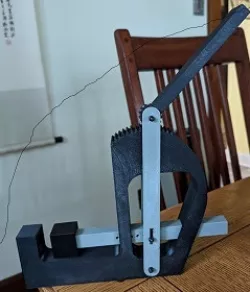
I saw this in an antique store and I thought I can do this.
3x 3mm x 45mm screws and 6 3mm nuts are needed
use the two nuts on each screw to lock them in place you could use thread lock or ny-lock nuts as well.
Print Settings
Printer Brand:
Prusa
Printer:
I3 MK3S
Rafts:
No
Supports:
No
Resolution:
.3 mm
Infill:
50%
Filament:
generic Polycarbonate for strength.
user preferance
Notes:
rotate the pieces for best printing to avoid supports. the hammer print with the round depression down. I just left the strings it left. I used 50% infill for strength if you want to try less it may break easier.
Print 2 of each part that has an x2 in the name.
Post-Printing
assembly
place the ram in the frame and place the anvil at the end i used a hammer to tap the ram into the square anvil hole. rotate the anvil so that the top piece is flush with the top of the frame where it presses against.
the throw is adjustable left the handle up and move the anvil to touch the nut press the handle into the gears then rotate the handle to crack the nut.
you have multiple holed to adjust for the size of the nut in the ram.
Category: Kitchen & Dining
Direct link to the original creator's page
Also Available On
More from badger
Similar Models
 prusaprinters
 prusaprinters
 prusaprinters
 prusaprinters
 prusaprinters
 prusaprinters
 prusaprinters
 prusaprinters
Model Specifications
Frequently Asked Questions
How do I download Nutcracker?
Click the "View on prusaprinters" button above to visit the original model page on prusaprinters. You can download the STL file directly from the creator's page for free.
What 3D printer can I use for this model?
This STL file is compatible with most FDM 3D printers (Creality Ender 3, Prusa MK3S+, Bambu Lab, etc.) and resin printers (Elegoo, Anycubic). Check the original page for recommended print settings and materials.
Is this 3D model free to download?
Yes, this model is available as a free download on prusaprinters. Some creators accept tips or donations.
Can I modify this STL file?
Most STL files can be modified using free software like Blender, TinkerCAD, or Meshmixer. Check the license on the original prusaprinters page to see if modifications are permitted by the creator.