 myminifactory
Pause Testing
Pause Testing
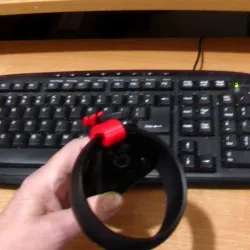
I wanted to test the "Pause" functions on my 3D Printer.
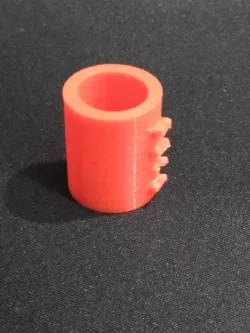
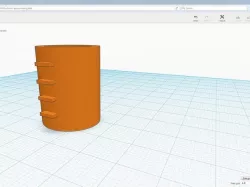
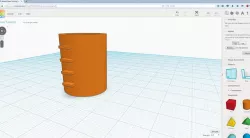
So I made this (light weight in plastic use and time), simple "stl" file.
All it is is a tube, 25mm height, with some small parts at 5mm heights stinking out.
Pause Testing. I wanted to test the "Pause" functions on my 3D Printer.https://youtu.be/wasaNlDuZss
Then using Cura I asked for the "Pause at height" plugin to pause at a Z height, (and also move the nozzle for easier access/filament changing etc), in my case 5mm and started to print.
This worked very well as I expected.
Note: the headbed and the nozzle temperatures stay on while Paused.
After Pause.
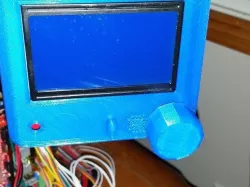
Clicking the knob on the LCD12864 Full Graphic Smart Controller moved the nozzle back to where the Pause started and continued the print without any issues.
Then I tried using the LCD12864 Full Graphic Smart Controller Pause option.
This worked BUT:-a) The nozzle stayed where it was Paused at. This causes a blob of plastic to be oozed onto the part at this position.b) It takes a bit of time to select the Pause option on the LCD12864 Full Graphic Smart Controller and printing continues until the Pause is actually selected. This means that the Pause may be harder to control the actual position of.
After Pause.
Selecting Resume on the LCD12864 Full Graphic Smart Controller started and continued the print from the unmoved nozzle position.
Direct link to the original creator's page
Also Available On
More from tail
Similar Models
 thingiverse
 prusaprinters
 grabcad
 thingiverse
 cults3d
 thingiverse
 thingiverse
 grabcad
Model Specifications
Frequently Asked Questions
How do I download Pause Testing?
Click the "View on myminifactory" button above to visit the original model page on myminifactory. You can download the STL file directly from the creator's page.
What 3D printer can I use for this model?
This STL file is compatible with most FDM 3D printers (Creality Ender 3, Prusa MK3S+, Bambu Lab, etc.) and resin printers (Elegoo, Anycubic). Check the original page for recommended print settings and materials.
Is this 3D model free to download?
This is a premium model priced at on myminifactory. Premium models often include higher detail, multiple parts, and print-tested files.
Can I modify this STL file?
Most STL files can be modified using free software like Blender, TinkerCAD, or Meshmixer. Check the license on the original myminifactory page to see if modifications are permitted by the creator.