 GrabCAD
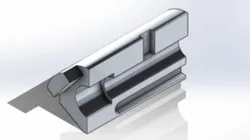
Pin Channel
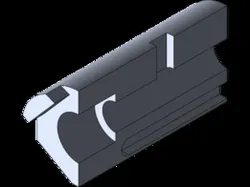
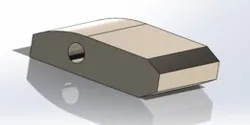
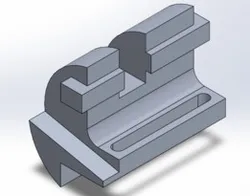
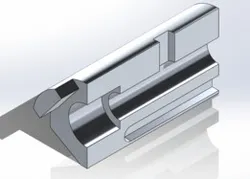
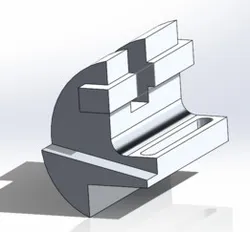
First, I started by sketching the line on the bottom and making it as long as I want and made the center line under it and made it infinite and smart dimensioned it to 30 degree angle. Next, I made another smaller line measuring 13mm and then measured the whole thing to 84mm. Then, I made a straight lineup and made a big circle measuring 84 for the radius and made a line straight up on the left side in order for it to connect. Then, I made the two smaller circles which the bigger one is 42 for the radius and the smaller to 53mm and trimmed everything on the right side so there's nothing. Next, I made the centerline box on the bottom right side of the sketch and made a centerline at the top left of the smaller circle. Then, I smart dimensioned everything and made sure it matched with the blueprint. Next, I extruded the big piece to 300mm, the half circle part to 225mm and the piece that sticks out to 340mm. Then, I made the bottom lines to 200mm and made sure it was 5mm up from the extruded portion and extrude cut it to 15mm. Then, I at the top of the design, I made a centerline of the 100mm then another line of 35mm and straight down to make a box and extrude cut it to 15mm as well . Lastly, I changed the material and made sure everything was done and checked my mass of the design.
Direct link to the original creator's page
Also Available On
More from Paige Evans
Similar Models
Model Specifications
Frequently Asked Questions
Where is Pin Channel published?
This model is published by its creator on GrabCAD. STLFinder only indexes it: the "View on GrabCAD" button above opens the original page, where the creator shares the RENDERING, SOLIDWORKS files under their own license.
What 3D printer can I use for this model?
This model is compatible with most FDM 3D printers (Creality Ender 3, Prusa MK3S+, Bambu Lab, etc.) and resin printers (Elegoo, Anycubic). Check the original page for recommended print settings and materials.
Is this 3D model free?
Yes, the creator shares it at no cost on GrabCAD. Some creators accept tips or donations.
Can I modify this file?
Check the license (see original page) on the original GrabCAD page. Most STL files can be modified using free software like Blender, TinkerCAD, or Meshmixer.