 thingiverse
Push-On-Push-Off Switch Bracket
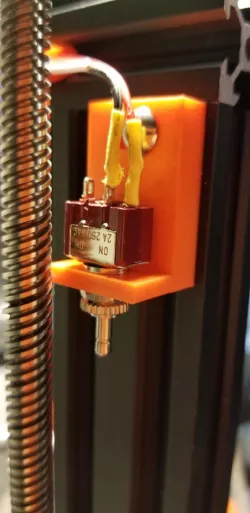
This is a bracket for holding a push-on-push-off switch to the vertical rail of an Ender 3, so that the gantry can activate the switch when you move Z to 220 mm height.
Used in conjunction with an external relay controlled power block to enable an auto-shutoff at the end of printing.
Using the POPO switch instead of a simple microswitch avoids the issue of the printer turning itself on again after powering off, if the gantry falls back off the switch.
This is the switch I used:
allelectronics.com/item/mpb-176/mini-spdt-push-on/push-off-switch/1.html
The bracket has a slot for a 4.5mm T-slot bolt and nut to affix it to the rail.
See this YouTube for the original auto shutoff design by CHEP
https://youtu.be/_dvHjjSTGZk
Direct link to the original creator's page
More from maiello00
Similar Models
 prusaprinters
 thingiverse
 grabcad
 grabcad
 grabcad
 cults3d
 grabcad
 grabcad
Model Specifications
Frequently Asked Questions
How do I download Push-On-Push-Off Switch Bracket?
Click the "View on thingiverse" button above to visit the original model page on thingiverse. You can download the STL file directly from the creator's page for free.
What 3D printer can I use for this model?
This STL file is compatible with most FDM 3D printers (Creality Ender 3, Prusa MK3S+, Bambu Lab, etc.) and resin printers (Elegoo, Anycubic). Check the original page for recommended print settings and materials.
Is this 3D model free to download?
Yes, this model is available as a free download on thingiverse. Some creators accept tips or donations.
Can I modify this STL file?
Most STL files can be modified using free software like Blender, TinkerCAD, or Meshmixer. Check the license on the original thingiverse page to see if modifications are permitted by the creator.