 GrabCAD
Rescue Buddy
RescueBuddy
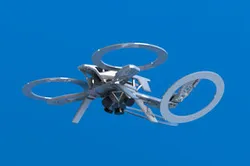
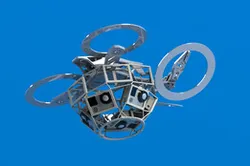
The RescueBuddy will go into action anytime there is a forest fire or missing person. Using four onboard Quark 640 thermal cameras with 9mm lenses that each have a 69 x 56 degree field of view. The drone will be able to react and make decisions based on thermal imaging.
A team of wildland firefighters will launch a RescueBuddy while fighting a forest fire to monitor the fires progress as they fight it. The ResuceBuddy will alert fire fighters to dangers of being entrapped, allowing them to escape before being trapped.
The Rescue Buddy can also be configured to help search and rescue missions. The emergency response team will activate the Rescue Buddy at the last know location of the missing person. The drone will fly an optimized pattern based on known topographic features acknowledging and identifying all thermal signatures. Once identified as a potential person based on their thermal signature, the onboard camera can be used to investigate and guide search and rescue to the missing person.
The Rescue Buddy has an optimized topology structure by only using support material where necessary. This reduces the amount of material required for manufacturing.
Technology: FDM
Material: PPSF was selected because of its high heat deflection temperature of 189 C.
Direct link to the original creator's page
More from Andrew J Young
Similar Models



Model Specifications
Frequently Asked Questions
Where is Rescue Buddy published?
This model is published by its creator on GrabCAD. STLFinder only indexes it: the "View on GrabCAD" button above opens the original page, where the creator shares the RENDERING, STEP / IGES files under their own license.
What 3D printer can I use for this model?
This model is compatible with most FDM 3D printers (Creality Ender 3, Prusa MK3S+, Bambu Lab, etc.) and resin printers (Elegoo, Anycubic). Check the original page for recommended print settings and materials.
Is this 3D model free?
Yes, the creator shares it at no cost on GrabCAD. Some creators accept tips or donations.
Can I modify this file?
Check the license (see original page) on the original GrabCAD page. Most STL files can be modified using free software like Blender, TinkerCAD, or Meshmixer.