 GrabCAD
Screw sealant applicator
Black part of the assembly is typical sealant applicator, everybody knows how it works so I won’t describe it now.
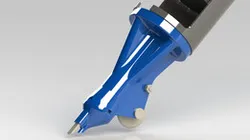
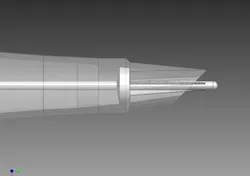
The most important part is at the bottom. It attaches to standard 310 ml caulk cartridge. Sealant is forced to chamber with screw inside, in which it increases its pressure. Screw also set amount of sealant (according to wheel speed). Output sealant is shaped by replaceable tip.
Few advantages:
- increasing speed = increasing sealant output. Output depends of wheel speed (which is running on a surface)
- middle of the screw increases its diameter towards end, so the pressure of sealant increase towards end
- you don’t have to dirty your fingers, there is a replaceable tip which is shaping the sealant
Watch video with annotations.
Direct link to the original creator's page
More from projectds


Similar Models
 GrabCAD
 GrabCAD
 GrabCAD
 GrabCAD
 Thingiverse
 Cults3D
 Thingiverse
 GrabCAD
Model Specifications
Frequently Asked Questions
How do I download Screw sealant applicator?
Click the "View on GrabCAD" button above to visit the original model page on GrabCAD. You can download the RENDERING, SOLIDWORKS, STEP / IGES, STL file directly from the creator's page for free.
What 3D printer can I use for this model?
This model is compatible with most FDM 3D printers (Creality Ender 3, Prusa MK3S+, Bambu Lab, etc.) and resin printers (Elegoo, Anycubic). Check the original page for recommended print settings and materials.
Is this 3D model free to download?
Yes, this model is available as a free download on GrabCAD. Some creators accept tips or donations.
Can I modify this file?
Check the license (see original page) on the original GrabCAD page. Most STL files can be modified using free software like Blender, TinkerCAD, or Meshmixer.