 thingiverse
Snapchat Code Custom
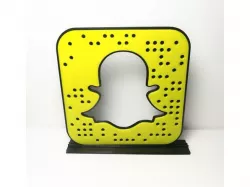
This is a 3d printed Snapchat Logo code. It does scan. For scanablity high contrast is necessary. In one color it can be used for decorative purpose only.
These codes have been produced by CustomGhostCodes.com.
Print in Black filament and switch to yellow filament after the 1mm layer has finished. This will produce a scanable code.
Getting your own code:
If you want to use your own code, there are a few steps to achieve this.
Download your Snapcode SVG from Snapchat
Go into your favorite design program and pull the SVG into a model.
Export to a .STL file
Slice with your printer settings.
Add pause code to switch filiment color.
Those are all the steps and you can produce your own code.
If you want this process done for you check out www.CustomGhostCodes.com
They will create your STL or complete the entire process for you.
Print Settings
Printer Brand:
Rostock
Printer:
Rostock MAX V2
Rafts:
No
Supports:
No
Resolution:
.2
Infill:
30%
Notes:
For this print to be scannable it must be printed in two colors. To achieve dual colors, the filament must be switched after the 1mm layer. This is done by entering pause code in the g-code.
Direct link to the original creator's page
Similar Models
 thingiverse
 thingiverse
 thingiverse
 thingiverse
 sketchfab
 pinshape
 thingiverse
 prusaprinters
Model Specifications
Frequently Asked Questions
How do I download Snapchat Code Custom?
Click the "View on thingiverse" button above to visit the original model page on thingiverse. You can download the STL file directly from the creator's page for free.
What 3D printer can I use for this model?
This STL file is compatible with most FDM 3D printers (Creality Ender 3, Prusa MK3S+, Bambu Lab, etc.) and resin printers (Elegoo, Anycubic). Check the original page for recommended print settings and materials.
Is this 3D model free to download?
Yes, this model is available as a free download on thingiverse. Some creators accept tips or donations.
Can I modify this STL file?
Most STL files can be modified using free software like Blender, TinkerCAD, or Meshmixer. Check the license on the original thingiverse page to see if modifications are permitted by the creator.