 prusaprinters
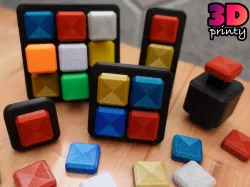
Snappy Fidget Button
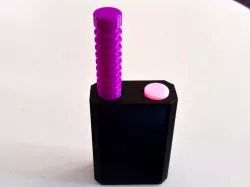
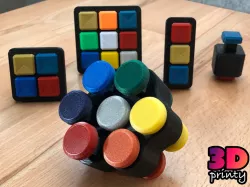
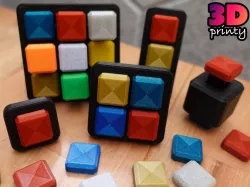
An easy to print snappy fidget toy.https://youtu.be/HrO0uZ5QgzIPrintingAll parts can be printed without supports.Add a brim if your printer has any difficulty with curling around sharp corners.The Button caps can be printer either upside down (no bridging) or right side up (potentially nicer top layer with minor hidden bridging).CustomizationFrame OptionsSingle button3x1 Row2x2 Square3x3 SquareTall FrameSpring OptionsStiffNormalSoftAdd alignment bars, if necessary, to reduce button wiggle. This is not necessary for the tall frameAssemblyInsert spring(s) into frame. Make sure that the spring is oriented so that the flexible sides line up with the two chamfered edges in the frame hole.Use a gel-like glue to attach button caps to either end of the spring. Avoid gluing the buttons to the frame.If desired, add alignment bars. If the bars do not stay in place, use a *very small* drop of glue on either end of the alignment bar. Make sure not to accidentally glue the spring.UpdatesAll springs and button caps have been updated to snap together. Glue can still be used, but is now optional. This is a tight fit, but a little force should work.Can I sell copies of this?Yes! This project was shared under the Creative Commons - Attribution license.This license allows selling copies, but you must provide proper attribution, as detailed in the license itself.Please note that any other projects linked here (remixes or related projects) may have a different license. Please respect those licenses.Click here for attribution examples
Direct link to the original creator's page
Also Available On
More from printi
Similar Models
Model Specifications
Frequently Asked Questions
How do I download Snappy Fidget Button?
Click the "View on prusaprinters" button above to visit the original model page on prusaprinters. You can download the STL file directly from the creator's page for free.
What 3D printer can I use for this model?
This STL file is compatible with most FDM 3D printers (Creality Ender 3, Prusa MK3S+, Bambu Lab, etc.) and resin printers (Elegoo, Anycubic). Check the original page for recommended print settings and materials.
Is this 3D model free to download?
Yes, this model is available as a free download on prusaprinters. Some creators accept tips or donations.
Can I modify this STL file?
Most STL files can be modified using free software like Blender, TinkerCAD, or Meshmixer. Check the license on the original prusaprinters page to see if modifications are permitted by the creator.