 GrabCAD
Toast - AutoCAD 2008
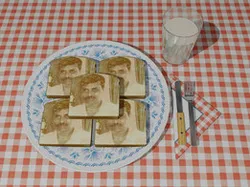
Ever see Jesus, Elvis, or President Obama on a piece of Toast?
Haven't you ever wondered why YOUR image is never on a piece of toast?
Well now it can be! How it works... Download and unzip the Toast - AutoCAD 2008.zip file. Place the DWG file in the same folder with the included materials. Get a photo of yourself (or a friend you want to spoof) , crop it to show just your face. Resize that to 400 x 400 and name it "Opacity UnCarl Fester.jpg". Change the colors to just Black and White (grey scale). Increase the contrast until it's nearly only black and white. Change the image from positive to NEGATIVE. Replace the material file "Opacity UnCarl Fester.jpg" with the file of your face. Open the included AutoCAD file, pick a custom view with the name "Render" in it (3 is a good one), and render it. Then once it's done rendering, chuckle! Enjoy! If you do not have AutoCAD, but would like to be on toast, send me a message, then the photo you want on toast.
Direct link to the original creator's page
More from Carl Garthwaite
Similar Models
Model Specifications
Frequently Asked Questions
How do I download Toast - AutoCAD 2008?
Click the "View on GrabCAD" button above to visit the original model page on GrabCAD. You can download the AUTOCAD, RENDERING file directly from the creator's page for free.
What 3D printer can I use for this model?
This model is compatible with most FDM 3D printers (Creality Ender 3, Prusa MK3S+, Bambu Lab, etc.) and resin printers (Elegoo, Anycubic). Check the original page for recommended print settings and materials.
Is this 3D model free to download?
Yes, this model is available as a free download on GrabCAD. Some creators accept tips or donations.
Can I modify this file?
Check the license (see original page) on the original GrabCAD page. Most STL files can be modified using free software like Blender, TinkerCAD, or Meshmixer.