 GrabCAD
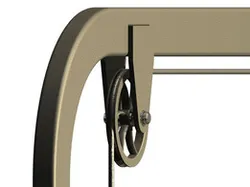
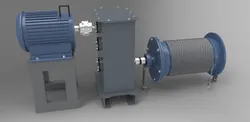
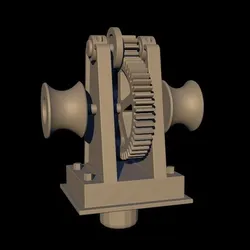
Winch experiment
Made with Autodesk Inventor 2014 as an Inventor Studio animation.
Inventor does not offer a tool to create a flexible thread or rope. However, we can create a part which can have the behavior of a rope. To do this, you need to have a little knowledge about Parameters (which can be found by activating Manage/fx Parameters) and Inventor Studio.
Keep in mind that here is nothing but a fake. A CAD fake! The left vertical thread is shortening, the right one is lengthening and the wheels are rotated accordingly. The illusion of a Dynamic simulation is perfect, but the system is artificially moved. Read next.
Considering the presented example, we create a „thread” in a form of an inverted „U” with rounded corners. The total length of the „thread” is 2560 mm, and initially the right vertical thread is 500 mm long. In this example I assigned the length of 500 mm to the „d3” parameter and I created a new „User parameter” with the name „Ltotal” = 2560 mm. The „d2” parameter corresponds to the length of the left vertical thread, and its value is given by a simple arithmetic formula which makes „d2” dependent on the values of „d3” and „Ltotal”. We say that the „d2” is a function of „d3” and „Ltotal” (where „Ltotal” is a constant).
Having the table parameters opened, we check the cell of „d3” in the column „Export Parameter”. You can see all these settings in the picture „Winch experiment - 1.jpg” (if you enlarge it).
Using this procedure we created the „d3” variable and we made it accessible from outside of the „Thread.ipt”. Now we open the assembly „Winch experiment.iam” and enter Environments/Inventor Studio. We see the item „Animation Favorites” on the browser (left) which does not have any „child”. By activating the tool „fx Parameter Favorites”, we obtain the dialog box that can be seen in the picture „Winch experiment - 2.jpg”.
You can see that I checked the cell „Favorites” on the „d3” line. Closing the dialog box, the item „Animation Favorites” earns the child „d3”.
We create a new animation, and we apply right-click on the „d3” child to activate the option „Animate Parameters”. We shall use the start value for „d3” as 500 mm and the end value as 850 mm. As an effect, the „d2” parameter will decrease of the mentioned arithmetic formula.
The rest is usual Inventor Studio procedure which does not need to be explained. The only thing is that we have to animate the winch wheels accordingly. This means that we have to rotate them a number of degrees that corres...
Direct link to the original creator's page
More from Constantin STANCESCU
Similar Models


Model Specifications
Frequently Asked Questions
How do I download Winch experiment?
Click the "View on GrabCAD" button above to visit the original model page on GrabCAD. You can download the AUTODESK INVENTOR, RENDERING, STEP / IGES file directly from the creator's page for free.
What 3D printer can I use for this model?
This model is compatible with most FDM 3D printers (Creality Ender 3, Prusa MK3S+, Bambu Lab, etc.) and resin printers (Elegoo, Anycubic). Check the original page for recommended print settings and materials.
Is this 3D model free to download?
Yes, this model is available as a free download on GrabCAD. Some creators accept tips or donations.
Can I modify this file?
Check the license (see original page) on the original GrabCAD page. Most STL files can be modified using free software like Blender, TinkerCAD, or Meshmixer.