 thingiverse
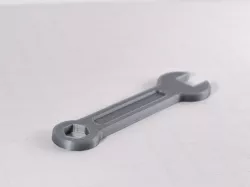
wrench
Learn how to modify a downloaded 3D model by clicking this link below:https://desktopmakes.lpages.co/modify-a-3d-model-thingiverse/
In this short video lesson I will show you how to customize Thingiverse models like this one. Enjoy!
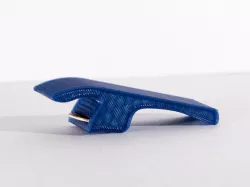
A wrench I designed to change the props on my quadcopter. I designed this with Fusion 360.
Fusion 360 for 3D printing design courses available at https://www.desktopmakes.com/
Print Settings
Printer Brand:
MakerBot
Printer:
MakerBot Replicator 2
Rafts:
No
Supports:
No
Resolution:
0.2mm
Infill:
20%
How I Designed This
I designed this with Fusion 360.
Learn how to design this model with Fusion 360 by taking my 3D Designing for 3D Printing course at udemy.com. Use coupon code THINGIVERSE for a 50% discount or click on link below.
https://www.udemy.com/designing-for-3d-printing-with-fusion-360/?couponCode=THINGIVERSE
http://www.desktopmakes.com/
Direct link to the original creator's page
Also Available On
More from make
 cgtrader
 prusaprinters
 prusaprinters
 prusaprinters
 prusaprinters
 prusaprinters
Similar Models
Model Specifications
Frequently Asked Questions
How do I download wrench?
Click the "View on thingiverse" button above to visit the original model page on thingiverse. You can download the STL file directly from the creator's page for free.
What 3D printer can I use for this model?
This STL file is compatible with most FDM 3D printers (Creality Ender 3, Prusa MK3S+, Bambu Lab, etc.) and resin printers (Elegoo, Anycubic). Check the original page for recommended print settings and materials.
Is this 3D model free to download?
Yes, this model is available as a free download on thingiverse. Some creators accept tips or donations.
Can I modify this STL file?
Most STL files can be modified using free software like Blender, TinkerCAD, or Meshmixer. Check the license on the original thingiverse page to see if modifications are permitted by the creator.